So as more and more people are switching from a traditional driver to an object based driver, it’s becoming evident that most people don’t know how to do a bulk change in the dictionary (or indeed that the feature even exists.) This post shows how to globally replace a driver, but you can use the same technique to do all kinds of bulk changes to Files or Fields.
-
MAKE A BACKUP (duh)
-
Open the Dictionary Search Result Pad.
VIEW menu ; Data Dictionary ; Dictionary Search Results -
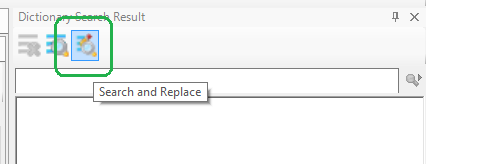
In the Dictionart Search Result pad click on the “Search and Replace” button.
-
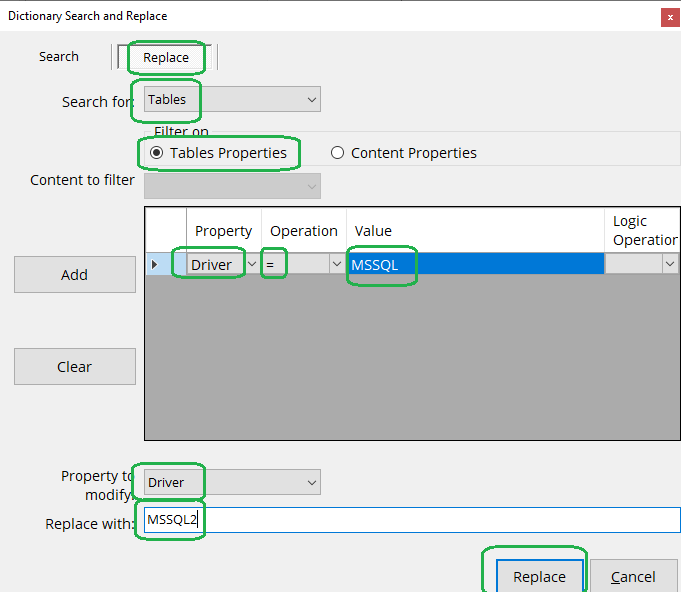
Select the search criteria, and what to change.
-
Click the REPLACE button.
You will likely need to click anywhere on the table list in the dict to see the results.
Update:
So, the search and replace is not setting the “dirty bit” for the tables that are edited. So, as Sean reports, the changes are lost as when the dict closes. I’ve found the easiest (so far) way to set
the dirty is to
- double-click each table listed in the results list.
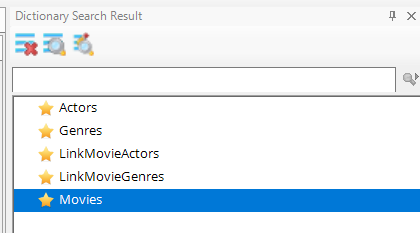
In my test I got this list of 5 files. Double clicking each file in the list results in the tab for that file opening. This is a pain, but still less work than making each change manually.