Ahhhh… this is where you use SETTARGET( Report , Band ) to specify the Report Detail Band onto which you draw with graphics Line(), Ellipse(), Box(), etc.
What I would do is put a normal LINE control on the Report. Then use code like below to put the Graphic Line() in the Position of the Line Control, which you hide:
    SETTARGET(Report,?DetailWithLine)   !Must have , ?Detail Band FEQ
    GETPOSITION(?Line1,X#,Y#,W#,H#)     !Line1 Control Position
    HIDE(?Line1)        !Hide to put Dotted line on top
    SETPENSTYLE(PEN:dot)
    Line(X#,Y# + 0,W#,H#)    !on top of Line 1
    PRINT(Rpt:DetailWithLine)
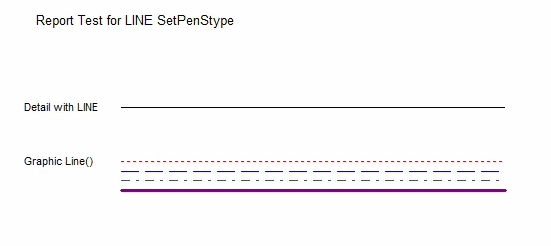
Here’s the output of my test showing the Detail with LINE, then the same with Dot, Dash and Dot+Dash lines:
Test Report Project Code:
    PROGRAM  !Report Test Framework. Get more tests from https://gist.github.com/CarlTBarnes/29f78a2ca43813e83489dc62a4d5e0c0
    MAP
    END

PreviewQ  QUEUE,PRE(PreQ)
FileName    STRING(260)
    END

    !>>>--Define your Report with ,PREVIEW(PreviewQ) attribute
Report REPORT,AT(1000,2000,6000,7000),FONT('Arial',10),PRE(RPT),PREVIEW(PreviewQ), |
            THOUS
        HEADER,AT(1000,1000,6000,1000),USE(?HEADER1)
            STRING('Report Test for LINE SetPenStype'),AT(208,94),USE(?STRING1),TRN
        END
DetailWithLine DETAIL,AT(0,0,6000,800),USE(?DetailWithLine)
            STRING('Detail with LINE'),AT(83,10,1229,146),USE(?DetailIsWhat),TRN,FONT(,8)
            LINE,AT(1094,83,4000,0),USE(?LINE1),LINEWIDTH(3)
        END
        FOOTER,AT(1000,9000,6000,1000),USE(?unnamed)
        END
    END

    CODE
    OPEN(Report)
    PRINT(Rpt:DetailWithLine)       !Print without drawing

    SETTARGET(Report,?DetailWithLine)   !Must have , ?Detail Band FEQ
    GETPOSITION(?Line1,X#,Y#,W#,H#)     !Line1 Control Position
    ?DetailIsWhat{PROP:Text}='Graphic Line()'
    HIDE(?Line1)        !Hide to put Dotted line on top
    SETPENCOLOR(Color:Red)   ; SETPENSTYLE(PEN:dot)     ; Line(X#,Y# +   0,W#,H#)
    SETPENCOLOR(Color:Blue)  ; SETPENSTYLE(PEN:dash)    ; Line(X#,Y# + 100,W#,H#)
    SETPENCOLOR(Color:Green) ; SETPENSTYLE(PEN:DashDot) ; Line(X#,Y# + 200,W#,H#)

!Edit 3/5/24 with 2 other styles
    SETPENCOLOR(Color:Orange) ; SETPENSTYLE(PEN:dashdotdot) ; Line(X#,Y# + 350,W#,H#)  !New
    SETPENCOLOR(Color:Olive)  ; SETPENSTYLE(PEN:solid)      ; Line(X#,Y# + 450,W#,H#)  !New

    SETPENWIDTH(10)    ! PenWidth >=10 sets back to Solid PenStyle, no way to do thick dash lines, maybe with multiple adjusting Y a little
    SETPENCOLOR(Color:Purple) ; SETPENSTYLE(PEN:Dash) ; Line(X#,Y# + 700,W#,H#)

    PRINT(Rpt:DetailWithLine)

    ENDPAGE(Report)

    !--Preview the report
    DO ReportPreviewRtn
    CLOSE(Report)

!-----------------  Open Preview Window and display --------------------------
ReportPreviewRtn    ROUTINE
    DATA
PreviewWindow WINDOW('Preview'),AT(,,495,332),FONT('MS Sans Serif',8,,FONT:regular),SYSTEM,MAX,RESIZE
       LIST,AT(1,2,245,11),USE(?List:PreviewQ),DROP(10),FROM(PreviewQ),VScroll,FONT(,10)
       IMAGE,AT(1,15),USE(?Image1),FULL ,hvscroll
     END
    CODE

    OPEN(PreviewWindow)
    ?List:PreviewQ{PROP:Selected}=1
    ACCEPT
        IF ACCEPTED()=?List:PreviewQ OR EVENT()=Event:OpenWindow
           GET(PreviewQ,CHOICE(?List:PreviewQ))
           ?Image1{PROP:Text}=PreviewQ
           DISPLAY
        END
    END
    CLOSE(PreviewWindow)
SETPENWIDTH() seems to prevent Pen Style.