I've not done this in decades. Not kidding.
I have a file loaded list box I need to add tagging - any quick resource to do this or perhaps a template?
Need to display a different color for tagged item in row
Hi Pratik,
There's an older thread on exactly this: Shift select multiple records in list box. The main options mentioned there are:
I'd skip the LIST's built-in MARK attribute on a template browse. The general advice here (see this thread) is that a separate queue of tagged record IDs works much better.
If you'd rather do it yourself, the colour part is built into the browse template:
TagQ QUEUE / TagQ:ID LIKE(PRE:ID) / END. Add to it or delete from it when the user tags or untags a row (a Tag button, a double-click, or the space bar), then refresh the browse.TagQ:ID = PRE:ID
GET(TagQ, TagQ:ID)
LOC:Tagged = CHOOSE(ERRORCODE() = 0)
At runtime the template checks each condition and uses the colours for the first one that's true, so tagged rows show in your colour and the rest keep the default.
Mark
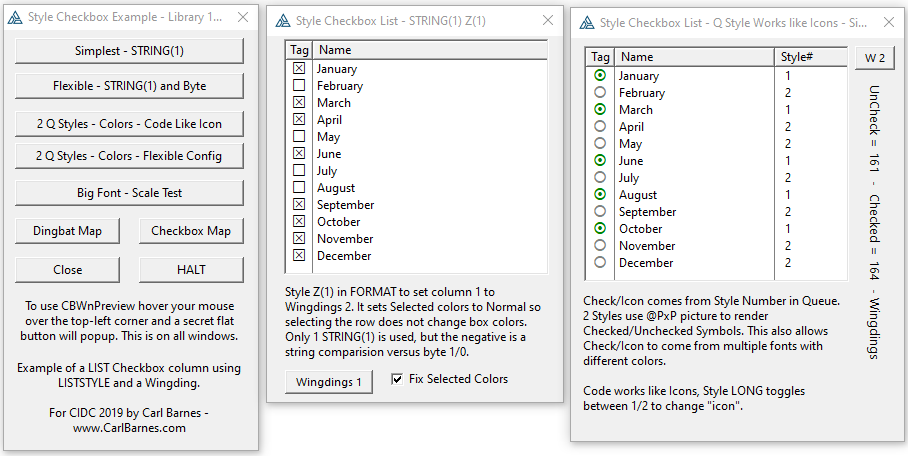
I have this that used Styles and Wingdings instead of icons which is nice that you need no extra icon files.
Styles would also be a way to color. As they are a font they scale to larger size for touch interface with no jagged lines.
Hi Carl,
WingDings ... VERY CLEVER!
TY
Thx Mark,
That did the trick - I was executing my code in .SetQueueRecord() at Priority 5000 - firing before the template code which overrode my values