The great big Ai LLM thread. Github code, blogs & opinions, walkthru's, trainer's & more

,

A practical example might be an internal support or operations assistant sitting on top of an in-house database.

Not “AI magic,” just something that can answer plain-language questions against company data without sending that data outside the building.

For example:

  • “Show me customers whose orders dropped off in the last 90 days.”
  • “Which products generate the most support calls after purchase?”
  • “List invoices overdue more than 30 days for customers in this region.”
  • “Summarize the common complaint themes from recent support notes.”

In that kind of setup, the LLM is not replacing the database. The database still holds the facts.

The AI layer is mainly helping translate human questions into something useful, summarize results, or spot patterns.

Two blogs suggesting agents.md and MCP are both better approaches than using Skills.

Interesting links. My take is that they are really pointing at three different layers, not one winner-take-all replacement for everything.

AGENTS.md makes sense for persistent project context and house rules. Skills still make sense for repeatable workflows. MCP makes more sense when the AI needs structured access to real tools and services.

So to me the takeaway is not that skills lost. It is that always-present context often works better than optional context, and real integrations deserve a real integration surface.

For something like Clarion, that feels about right.

Keep the baseline project guidance always visible, then layer specific workflows and tools on top of that.

I reckon it’ll be another 3 years before it can handle Irish names! [g]

1 Like

There’s a lot of context or background these Ai LLM’s currently lack but their current success show’s the correct context can be ascertained from the limited input they get with input.

However, whilst I cant prove it, I do think there are some dark channels or not obvious channels providing more context or background. I see that with Google alot, its what Rumsfeld called the Unknown Known’s. eg IP address, Browser fingerprinting, Pattern of Operation ie time of day, day of week usage patterns, swiping characteristics. Whilst the Iphone provides a Venn diagram for more people to hide in, its still possible to find the needle in the haystack!

running AI out of clarion isnt the hard part one supposes how to embed it in a template and what features it should support . we dont use ABC since 2007 … no idea what features you would expose to AI in an ABC app.. but im sure the clever developers out there will.

I was thinking about this yesterday. I think some templates could make using some Ai LLM’s more accurate, but how much would the templates need to do?

Imagine a code template dropped onto an Embed point, an ABC class method. would/should the Ai know about this embed point or be blind to it and its limited functionality?

Likewise should the Ai templates store each and every prompt with its resulting output for historical reasons?

Should the templates work from a local or central (read github public repo) that populates the agents.md, skills, mcp parts of the Ai model? This could be useful for distributed dev teams, or just useful for every clarion programmer using Ai to code with.

Lots of question’s, dont even know if there is any demand for it either.

But it could be done right now…

well we were thinking more about what features would an ABC developer want to expose to the USER of the app from AI. As AI Claude has already processed the main ABC TPL and some basic TPW’s such a Browse, Popup Menu, Form, Report , Process; these being your basic ABC Templates. Its an old GUI Database centric early 2000’s app generator. But many apps today still do those basic jobs. What feature enhancements would AI offer if the Internals of the APP were exposed to AI which is pretty easy to do. The real power of clarion which is still working today is it ability to call CPP abstract interfaces and threading. This power offers the ability to repower and reimagine your basic Clarion APP. Even thought the Topspeed compilers were create before the upgrades to CPP that have occurred since the early 2000’s this new CPP power can be used by Clarion TODAY out of the box.. Try that with so called modern languages and you will go through hoops..

I’ve yet to get an Ai LLM or see on Youtube one of these Ai LLM’s turn out functioning clarion code or functioning template code.

Like I’ve said before, they just dont work for me. Making me the unluckiest person on the planet going…

Edit. I you know of any youtube vids showing an Ai LLM writing Clarion code, post the link here pls.

Hi Richard,

I don’t have a video for this, but I thought I’d share something practical I’ve been working on using GitHub Copilot CLI.

This repo came out of a client discussion about needing a Kanban-style window in their applications:

:backhand_index_pointing_right: GenericKanban (GitHub)
A generic, database-agnostic Kanban board ActiveX control for Clarion, built with WebView2, SortableJS, and TypeScript.

I used Copilot CLI extensively throughout the build — including generating the wrapper template.

As you’d expect, the AI doesn’t really understand Clarion or the template language out of the box. A lot of the work is:

  • steering it with prompts
  • feeding it examples (existing templates, decompiled help, etc.)
  • iterating through testing and correction

It doesn’t get everything right first time, but it does respond well to guidance.

That said, I’d estimate that over 90% of the code in that repo was generated by AI — including the template layer, which makes use of CapeSoft’s class wrapper approach.


There’s also some interesting work going on in the community.

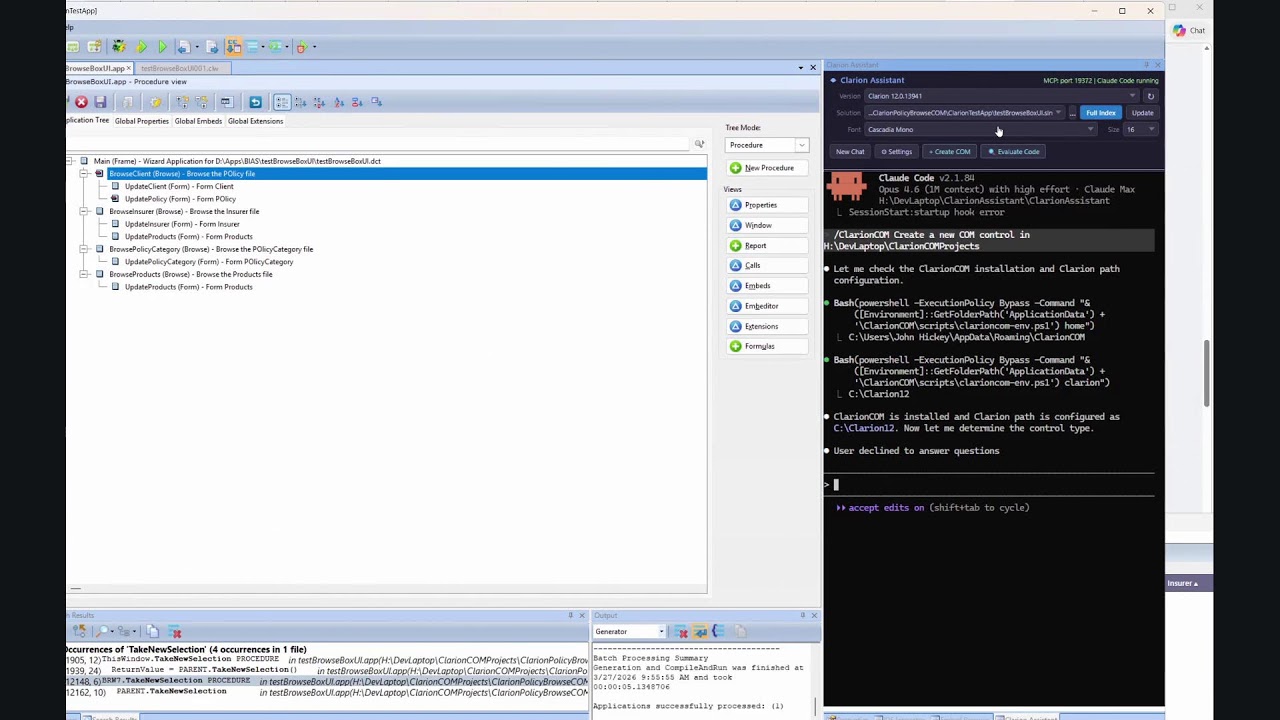
Clarion Assistant (by John Hickey) integrates Claude Code directly into the Clarion IDE (Clarion 10+), and goes quite a bit further in terms of context and tooling:

:backhand_index_pointing_right: Clarion Assistant (GitHub)

If you’ve got the time, the recent Clarion AI workshops are worth a watch:

:backhand_index_pointing_right: ClarionLive YouTube Channel


The main takeaway for me is that getting useful Clarion output from AI requires more than a web chat like ChatGPT.

Tools like GitHub Copilot CLI or Claude Code feel like the minimum, because:

  • they can work across files
  • they maintain better context
  • they allow iterative refinement in a real codebase

The downside, of course, is that this creates a bit of a barrier — since these tools typically require paid subscriptions, which not everyone will want (or be able) to justify, depending on how they’re working or what they’re using them for.

Just my 2 cents.

Mark

1 Like

Tak for the post .. the Clarion Assistant GitHub is of great interest!

I think that is still too broad a statement.

I have paid subscriptions (the $20 a month variety) to ChatGPT, Claude, and Gemini, and I also use Grok and DeepSeek. I work with all of them.

Over the past year, I have written literally tens of thousands of lines of excellent Clarion code with AI assistance.

So I will gladly agree with one narrow point: if someone opens a plain ChatGPT window, asks a simple Clarion question with no context, and expects great code back, they are probably not going to like the result.

But that is not the same thing as saying you need Claude with a $200 a month subscription, or that ChatGPT cannot do first-class Clarion work.

What matters is context, guardrails, and how you ask. If you give GPT the existing code pattern, the surrounding embed or procedure context, the formatting rules, the business rules, the expected result, and the constraints it has to stay within, you absolutely can get first-class Clarion code back. I do it all the time.

To me, that is the real distinction here:

It is not really “Claude versus ChatGPT.”
It is “thin prompting versus disciplined prompting.”

The better tool integrations can absolutely help. I am not arguing otherwise. More repo awareness, better file traversal, better IDE integration, and stronger workflow plumbing are all useful.

But those things are workflow advantages. They are not proof that ChatGPT is somehow incapable of doing good Clarion work.

So I would frame it this way:

  • Yes, one-shot AI use in Clarion is often disappointing.
  • Yes, niche languages like Clarion need more steering.
  • No, you do not have to have Claude to get good results.

And no, I do not think it helps the conversation to imply that ChatGPT is somehow disqualified from serious Clarion work.

Used casually, it can disappoint.

Used properly, it can produce excellent work.

Those are two very different claims.

Hi Charles,

I actually don’t disagree with what you’re saying there.

“Thin prompting vs disciplined prompting” is a really good way of putting it, and I’d agree that if you give enough context, examples, and constraints, you can get very good Clarion output from ChatGPT.

I think where I was coming from is slightly different — more about workflow and how quickly you can get to that level of context.

In practice, I’ve found tools like GitHub Copilot CLI or Claude Code can gather and retain context far quicker than I realistically could in a chat window. Not because the underlying model is better, but because they:

traverse the repo
pull in surrounding code automatically
and maintain that context across iterations

You can absolutely recreate that manually in a chat — but it’s more effort, and a bit more fragile over time.

Also worth noting that with Copilot CLI, it’s not just “one model vs another” anymore. You’ve effectively got access to multiple models under the hood (including the same families used by Claude Code), and features like the rubber-ducking approach — where a different model is used to review or challenge plans and changes — have been surprisingly useful in practice.

So for me it’s less:

“ChatGPT can’t do Clarion”

and more:

“the tooling reduces the friction of doing it well, consistently”

On the subscription side, I’m not on anything like a $200/month setup either — I’m using a Pro+ level CLI subscription and tend to top it up by maybe another $30–$40 over the month depending on usage. So I’m definitely not coming at this from a “high-end tooling only” perspective.

But I do agree with your core point — used properly, with the right context and discipline, the models themselves are capable of producing solid Clarion code.

Hi Mark,

Yes, that makes sense, and I think we are basically in agreement.

My pushback was really only against the stronger interpretation that ChatGPT itself could not do serious Clarion work. Framed as a workflow and tooling advantage, I think your point is quite fair.

The models are capable. Better tooling just lowers the friction of using them well.

I’ve repeatedly checked the ClarionLive youtube channel this is all I see, and I see there is now 1 Ai workshop thats visible thats appeared in the last 24hours!

This is what comes up in Google with the search term “clarion live ai workshop”

Now I did happen to stumble upon John saying the Ai LLM’s werent very good, but now appear to be, he says that in the 2026.03.27 @ 319 seconds here : https://youtu.be/4ZJ2TdwOzXc?t=319

At 45:59 we can see Clarion Assistant in use, analysing in this example AnyFont.

Well I think this is a good example of Claude’s ability, so I’ll let other’s decide on how good or bad it is.

there are big chip silicone developments going on in off loading transport layers on servers into silicone which should allow less load on server chips. That said the maths behind AI is the currently the same its just they are refining the accessing of the internals of the models. That said claude is only as good as it training and the maths… Still it generated its own CPP binding patterns for our Micro Kernel VM in CPP that lets our apps talk direct to AI and as we did a little demo on this site. Its easier to call CPP code in clarion then Dot Net. The questions is what in a standard ABC app which are menu, browse, form , process connecting to data sources could be made AI driven or accessible? Running claude inside your IDE is great but the number of mistakes AI makes also means you not always want AI to directly access your source files..Yr going to want versions and roll back support in that AI IDE addin. Note one commentator saying he did not want it touching his source. AI can also do auto directory version control for you.

I assume you mean the Layer 4 of OSI, in which case that already happens in the Network Card processor, so where are they going to offload?

Just a side note, you can hang OS’s and use this as an attack vector… :distorted_face:

https://www.cs.tau.ac.il/~mad/publications/asplos2021-offload.pdf

The Clarion IDE assistant by John Hickey is showing off an MCP server for the editor. Shows AI CO PILOT generating a MCP solution. The example we posted on the site was a direct connection to the END POINT API. Not an MCP server but a direct connection to the API END POINT.