Don´t delete c12.13941 without testing the most critical windows.
I found some issues in certain windows that are difficult to explain but simply don’t work as they should.
For example, they might not select fields with the mouse or they might always jump to touch fields.
i just won’t work with 14000. It is on a computer I load new tool release on but nothing else. Thanks.
The email that SoftVelocity sent out regarding build 14000 contained an incorrect download link for many developers.
SoftVelocity responded to one developer with the following explanation:
“We sent the emails from the MailerLite platform. It reverted the download link to the link for version 13999 that we had sent the previous Friday. This is a severe problem with the platform.”
I know of a couple of developers who received the correct 14000 link, but like myself, most appear to have received an invalid link in the 14000 email and currently no other email has been received.
Mark
My 14000 ZIP has a 14000 exe inside. I didn’t run a compare with the 13999 and just installed in the generic acceptance workstation. We clone it before we load vendor releases. Same problems when I tried to use 14000 as before. I am just working with the original release on my dev.
I’m still waiting for a download link that doesn’t download 13999… SV isn’t very snappy on getting that done, but I’ll wait.
Used to be SV would release a test build to 3rd party for a minimum check of the templates whenever work was done in the generator. Version 7 wouldn’t load a single template from my tools and that happened once again but in this case I’m gathering dust!!!

I’ve read that some folks contacted SV and received a new link.
And so it did, as if by magic… nope, just email ! ! !
I also mailed SV and received the correct 14000 download link.
It would be nice if SV resend the correct mail to all their customers, but you have to contact them yourself, I guess…
Best regards
Jeffrey
Nope…
Ran flawlessly here at work…
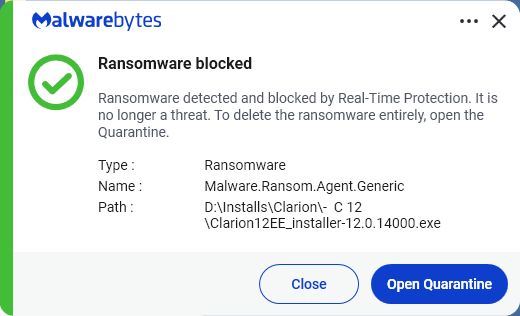
Malware.Ransom.Agent.Genericis a detection flag used by Malwarebytes for files that display suspicious, ransomware-like behaviors but haven’t been assigned to a specific malware family. It is often triggered by heuristic (behavioral) machine learning or a file’s unclassified encryption capabilities.
If you feel confident its not…
https://help.malwarebytes.com/hc/en-us/articles/31589211404571-Report-a-false-positive-to-Malwarebytes-Support
VirusTotal - File - 06a5311895163f1a4759251b9372bb02c88723bf85defb40d0eff38e7b5244ea
It’s perfectly fine 
Friedrich
Friedrich,
The problem is that Malwarebytes says the EXE is fine. It’s while it’s expanding one of the files in the install, that’s when Malware sees something and kicks it out.
Lee,
it would be interesting to find out which file causes the false-positive bug in their system so that it could be submitted to Malwarebytes for a fix in the next definition update. Can you see the last file written in the uninstall log? Perhaps Bob Z. can then check whether this file (or the next one) is the culprit.
Friedrich
Friedrich,
This is making less and less sense!
Every copy of the install file crashed and burned, usually right after Japan.png but not always.
My 12th attempt DID finally install but I’m damn near to frightened to open it! 
Did a full disk image backup and ran a deep scan overnight with Eset and Malware. They both found a few things and quarantined them, nothing related to Clarion.
Weird, but somehow fixed??? 
Could someone provide me an APP demonstrating the problem with incorrect generating programs in 13999? Better - without usage of 3rd party templates and classses. I guess, it is related to changes in the INC files parser I sent to SV. That change was to fix a real problem with handling | (pipe) and ! characters in some contexts. I do not see any errors in my fix.
Alexy, i can send if you need, but the issue was fixed in Build 14000. So currently its closed…
It is not fixed, the change was rolled back. The original problem this change was made to fix remains alive in 14000.
Please send me a test APP.