\
**Category:** questions\
**Tags:** dll, pdf\
**Created:** [January 31, 2025, 7:58am UTC](https://clarionhub.com/t/wkhtmltopdf-dll-prototype/7881 "2025-01-31T07:58:35Z")\
**Posts on this page:** 20\
**Page:** 2
**Author:**  [@jslarve](https://clarionhub.com/u/jslarve)\
**Post date:** [March 3, 2025, 12:02am UTC](https://clarionhub.com/t/wkhtmltopdf-dll-prototype/7881/21 "2025-03-03T00:02:19Z")
Not sure if it’s applicable to your requirements, but that’s the kind of thing I wrote my redirection class for on Clarionmag.
---
**Author:**  [@Koen](https://clarionhub.com/u/Koen)\
**Post date:** [March 3, 2025, 8:32pm UTC](https://clarionhub.com/t/wkhtmltopdf-dll-prototype/7881/22 "2025-03-03T20:32:07Z")
What is the output of `fName.getValue()`?
Might be useful to give an example how a filename looks like aka the whole img tag in html code.
---
**Author:**  [@vitesse](https://clarionhub.com/u/vitesse)\
**Post date:** [March 4, 2025, 1:39am UTC](https://clarionhub.com/t/wkhtmltopdf-dll-prototype/7881/23 "2025-03-04T01:39:46Z")
Hi Koen
Dirk’s earlier example was:
> [@Dirk1](#):
>
> ```auto
> ![“[image]”/](“…/…/logo.jpg” "“logo.jpg”") >
> ```
so based on that fName should hold ‘…/…/logo.jpg’
so after doing fName.replace(‘…/’,‘’) it should then hold just ‘logo.jpg’
---
>
> ```
so based on that fName should hold ‘…/…/logo.jpg’
so after doing fName.replace(‘…/’,‘’) it should then hold just ‘logo.jpg’
---
**Author:**  [@Dirk1](https://clarionhub.com/u/Dirk1)\
**Post date:** [March 4, 2025, 12:27pm UTC](https://clarionhub.com/t/wkhtmltopdf-dll-prototype/7881/24 "2025-03-04T12:27:41Z")
To be more exact two examples
\ **Author:**  [@Mike\_Duglas](https://clarionhub.com/u/Mike_Duglas)\
**Post date:** [March 4, 2025, 1:04pm UTC](https://clarionhub.com/t/wkhtmltopdf-dll-prototype/7881/25 "2025-03-04T13:04:22Z")
I guess this api should help:
[PathRelativePathToA function (shlwapi.h) - Win32 apps | Microsoft Learn](https://learn.microsoft.com/en-us/windows/win32/api/shlwapi/nf-shlwapi-pathrelativepathtoa)
---
**Author:**  [@Mike\_Duglas](https://clarionhub.com/u/Mike_Duglas)\
**Post date:** [March 4, 2025, 1:04pm UTC](https://clarionhub.com/t/wkhtmltopdf-dll-prototype/7881/25 "2025-03-04T13:04:22Z")
I guess this api should help:
[PathRelativePathToA function (shlwapi.h) - Win32 apps | Microsoft Learn](https://learn.microsoft.com/en-us/windows/win32/api/shlwapi/nf-shlwapi-pathrelativepathtoa)
---
**Author:**  [@vitesse](https://clarionhub.com/u/vitesse)\
**Post date:** [March 4, 2025, 7:32pm UTC](https://clarionhub.com/t/wkhtmltopdf-dll-prototype/7881/26 "2025-03-04T19:32:59Z")
in DOS and Windows a parent directory is noted by two dots, so this might be worth a try:
```clarion
fName.replace('…/','..\')
fName.replace('/','\')
```
and perhaps explicitly specify the path:
```clarion
fName.replace('…/','..\')
fName.replace('/','\')
if fName.startsWith('..\') ! two dots indicates parent directory
fName.prepend(longPath() & '\')
elsif fName.startsWith('.\') ! one dot indicates current directory
fName.RemoveFromPosition(1,1) ! remove first character (or fName.top(1))
fName.prepend(longPath())
end
```
or alternatively
```clarion
fName.replace('…/','..\')
fName.replace('/','\')
if fName.startsWith('..\') ! two dots indicates parent directory
fName.prepend(longPath() & '\')
elsif fName.startsWith('.\') ! one dot indicates current directory
fName.replace('.',longPath(),1) ! replace initial dot
end
```
I think that should work and be easier than splitting fName on ‘\’ and deleting lines then joining again - but let us know how you go…
cheers
Geoff R
---
**Author:**  [@vitesse](https://clarionhub.com/u/vitesse)\
**Post date:** [March 4, 2025, 10:27pm UTC](https://clarionhub.com/t/wkhtmltopdf-dll-prototype/7881/27 "2025-03-04T22:27:24Z")
> [@vitesse](#):
>
> I think that should work and be easier than splitting fName on ‘\’ and deleting lines then joining again
but if you did want to do that it shouldn’t be too hard. Something like:
```clarion
x long,auto
recs long,auto
code
fName.replace('…/','..\')
fName.replace('/','\')
if fName.startsWith('..\') ! two dots indicates parent directory
fName.prepend(longPath() & '\')
elsif fName.startsWith('.\') ! one dot indicates current directory
fName.replace('.',longPath(),1) ! replace initial dot
end
fName.split('\')
recs = fName.records()
loop x = 2 to recs
if fName.getLine(x) = '..' and x > 1
fName.deleteLine(x)
fName.deleteLine(x-1)
x -= 2
recs -= 2
end
end
fName.join('\')
```
as before, let us know how you go…
cheers
Geoff R
---
**Author:**  [@PurpleEdge2214](https://clarionhub.com/u/PurpleEdge2214)\
**Post date:** [March 5, 2025, 12:10am UTC](https://clarionhub.com/t/wkhtmltopdf-dll-prototype/7881/28 "2025-03-05T00:10:55Z")
> [@vitesse](#):
>
> ```auto
> fName.replace('…/','..\')
> fName.replace('/','\')
> if fName.startsWith('..\') ! two dots indicates parent directory
> fName.prepend(longPath() & '\')
> elsif fName.startsWith('.\') ! one dot indicates current directory
> fName.replace('.',longPath(),1) ! replace initial dot
> end
>
> ```
> [@Dirk1](#):
>
> \ where the image is
> C:\Clarion11|Images\CC\_LOG.JPG
>
> \
where the image is
> C:\Clarion11|Images\CC\_LOG.JPG
>
> \ where the image is
> C:\Clarion11\exes\MijnTaken\DATA\_MYTASKS\RAPPORT\logo.jpg
Why not just replace…
…/…/…/…/Images with C:\Clarion11|Images
and…
…/…/…/MijnTaken with C:\Clarion11\exes\MijnTaken
? If they are the only two paths?
---
where the image is
> C:\Clarion11\exes\MijnTaken\DATA\_MYTASKS\RAPPORT\logo.jpg
Why not just replace…
…/…/…/…/Images with C:\Clarion11|Images
and…
…/…/…/MijnTaken with C:\Clarion11\exes\MijnTaken
? If they are the only two paths?
---
**Author:**  [@seanh](https://clarionhub.com/u/seanh)\
**Post date:** [March 5, 2025, 1:26am UTC](https://clarionhub.com/t/wkhtmltopdf-dll-prototype/7881/29 "2025-03-05T01:26:40Z")
is the 3 dots …/ correct? unix and dos/windows paths are 2 dots for the parent directory with \*nix using a / as a seperator and dos a
So I would have thought ../../file would have been the thing to use.
---
**Author:**  [@vitesse](https://clarionhub.com/u/vitesse)\
**Post date:** [March 5, 2025, 1:31am UTC](https://clarionhub.com/t/wkhtmltopdf-dll-prototype/7881/30 "2025-03-05T01:31:42Z")
> [@PurpleEdge2214](#):
>
> ? If they are the only two paths?
yes Geoff that is the question… I was giving a more general solution rather than “hard coding” in a path which may change down the track.
cheers
(the other) Geoff
---
**Author:**  [@vitesse](https://clarionhub.com/u/vitesse)\
**Post date:** [March 5, 2025, 1:35am UTC](https://clarionhub.com/t/wkhtmltopdf-dll-prototype/7881/31 "2025-03-05T01:35:09Z")
> [@seanh](#):
>
> is the 3 dots …/ correct?
no idea Sean - that is just what Dirk mentioned/specified.
I am replacing them with two dots to mean parent directory… as that is what Dirk’s examples implied.
```auto
fName.replace('…/','..\')
```
BTW stay safe from Cyclone Alfred heading your direction - hope it misses or peters out.
cheers
Geoff R
edit: I just realised the three dots on Dirk’s example is actually just one character (ellipsis ie. ‘\<133\>’) not three separate dot characters. Regardless, the replace statement above changes it to two dots.
---
**Author:**  [@Dirk1](https://clarionhub.com/u/Dirk1)\
**Post date:** [March 5, 2025, 8:14am UTC](https://clarionhub.com/t/wkhtmltopdf-dll-prototype/7881/32 "2025-03-05T08:14:00Z")
Hi all,
For some reason when i past ../ from html it is changed to …/ So i ment ../
The images can be inserted from any place from the local drive.
So i need something (pseudcode)
```clarion
fName.replace('/','\')
if fName.startsWith('..\')
count# '..\'
Loop Count#
delete from right to left fname '\' to '\'
delete from left to right fname '..\'
end
fname=longpath()&'\'&fname
If fname not exists
Message('Local Image(s) will not show correctly when sending html E-mail, Change the image(s) to embed data in the html editor' )
end
```
3/5/25 Carl Edited post to change to `CODE` with ```
---
**Author:**  [@Dirk1](https://clarionhub.com/u/Dirk1)\
**Post date:** [March 5, 2025, 8:16am UTC](https://clarionhub.com/t/wkhtmltopdf-dll-prototype/7881/33 "2025-03-05T08:16:36Z")
For some reason the two dots are changed to 3 but it’s about two dots and a backslash
---
**Author:**  [@vitesse](https://clarionhub.com/u/vitesse)\
**Post date:** [March 5, 2025, 10:50am UTC](https://clarionhub.com/t/wkhtmltopdf-dll-prototype/7881/34 "2025-03-05T10:50:15Z")
> [@Dirk1](#):
>
> So i need something (pseudcode)
Dirk, unless I have missed something I think you already have the code you need above - try it and see.
cheers
Geoff R
---
**Author:**  [@vitesse](https://clarionhub.com/u/vitesse)\
**Post date:** [March 5, 2025, 10:58am UTC](https://clarionhub.com/t/wkhtmltopdf-dll-prototype/7881/35 "2025-03-05T10:58:13Z")
> [@Dirk1](#):
>
> For some reason the two dots are changed to 3
seems weird but there are options to tell it to not mess with the text
try “quoting” or “formatting” the code/text etc by putting three tildas or backticks before and after text. or you can try putting a \> at the start of a single line
> like this
for clarion code you can put three tildas (~) or backticks (`) followed by the word “clarion” ie. ```clarion.
for more info see
> **[Formatting posts using markdown, BBCode, and HTML](https://meta.discourse.org/t/formatting-posts-using-markdown-bbcode-and-html/239348)**
>
> 🔖 This reference guide details all the formatting options available in Discourse posts, including markdown, BBCode, and HTML. It specifies what is supported and provides resources where you can see examples. 🙋 Required user level: All users ...
hth
---
**Author:**  [@CarlBarnes](https://clarionhub.com/u/CarlBarnes)\
**Post date:** [March 5, 2025, 3:51pm UTC](https://clarionhub.com/t/wkhtmltopdf-dll-prototype/7881/36 "2025-03-05T15:51:15Z")
> [@Dirk1](#):
>
> For some reason the two dots are changed to 3 but it’s about two dots and a backslash
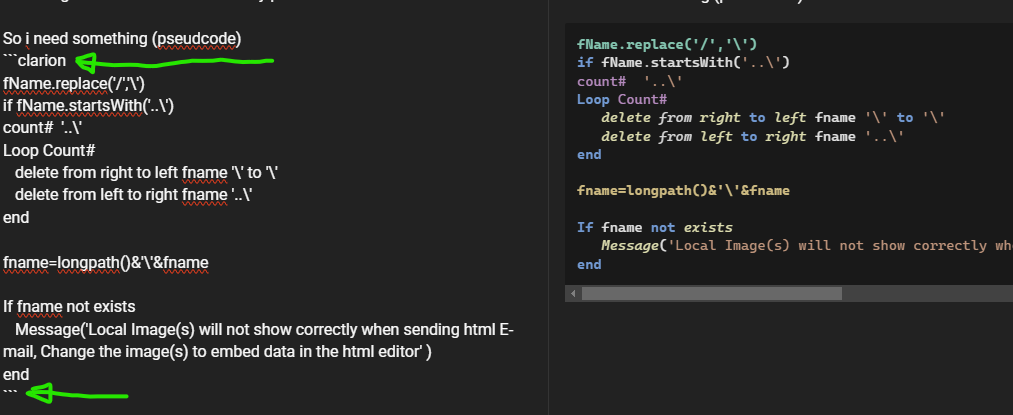
As Geoff said wrap your code with 3 backticks ``` plus “clarion” and it will be `CODE` with color syntax highlighting for Clarion.
I edited your post. Below is screen cap of Editor on Left with markdown and Preview on Right that shows `CODE`:
* * *
_Without that it looked like below:_
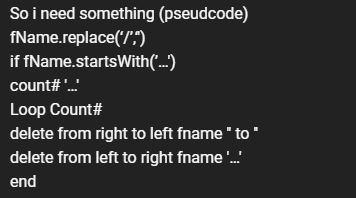
* * *
One thing to consider in your file name work is you may have a Root Path like C:\
---
**Author:**  [@Dirk1](https://clarionhub.com/u/Dirk1)\
**Post date:** [March 11, 2025, 1:52pm UTC](https://clarionhub.com/t/wkhtmltopdf-dll-prototype/7881/37 "2025-03-11T13:52:11Z")
Thanks all,
It’s working now
---
**Author:**  [@vitesse](https://clarionhub.com/u/vitesse)\
**Post date:** [March 11, 2025, 9:56pm UTC](https://clarionhub.com/t/wkhtmltopdf-dll-prototype/7881/38 "2025-03-11T21:56:25Z")
good to hear that Dirk, glad you got it working and thanks for letting us know.
in case anyone with a similar requirement refers to this thread in the future, would you like to post your final working code?
cheers
Geoff R
---
**Author:**  [@Dirk1](https://clarionhub.com/u/Dirk1)\
**Post date:** [March 12, 2025, 8:00am UTC](https://clarionhub.com/t/wkhtmltopdf-dll-prototype/7881/39 "2025-03-12T08:00:20Z")
Hi Geoff,
```
fname.SetValue(filename)
fName.replace('/','\')
fName.split('..\')
recs = fName.records()-1
Rootfolder=glo:uncmap&'\HTML_MERGEFILES' ! here are the html files
loop recs times
Rootfolder=removelastdir(Rootfolder)
end
loop x = 1 to recs
if fName.getLine(x) = '..\' and x > 1
fName.deleteLine(x)
fName.deleteLine(x-2)
x -= 3
recs -= 3
end
end!loop
fName.join('')
if img.loadfile(rootfolder&'\'&fname.GetVal())
if img.len() > 0
img.base64Encode(st:noWrap)
replaces=st.replace(tagContents[tagStart+1:tagEnd - 1],'data:image/'&fName.extensionOnly()&';base64,'&img.getValue())
end
end
```
---
**Author:**  [@vitesse](https://clarionhub.com/u/vitesse)\
**Post date:** [March 13, 2025, 12:29am UTC](https://clarionhub.com/t/wkhtmltopdf-dll-prototype/7881/40 "2025-03-13T00:29:58Z")
thanks Dirk for posting your code and, as I said earlier, I am glad you have it working for you.
However, having said that, I do have some concerns about your code.
in order to get rid of the “..\” or “move up a level to parent directory” I earlier posted this split/join code:
```clarion
fName.split('\')
recs = fName.records()
loop x = 2 to recs
if fName.getLine(x) = '..' and x > 1
fName.deleteLine(x)
fName.deleteLine(x-1)
x -= 2
recs -= 2
end
end
fName.join('\')
```
in your code this is changed to:
```clarion
fName.split('..\')
recs = fName.records()-1
Rootfolder=glo:uncmap&'\HTML_MERGEFILES' ! here are the html files
loop recs times
Rootfolder=removelastdir(Rootfolder)
end
loop x = 1 to recs
if fName.getLine(x) = '..\' and x > 1
fName.deleteLine(x)
fName.deleteLine(x-2)
x -= 3
recs -= 3
end
end!loop
fName.join('')
```
initially I was concerned that you are deleting line (x-2) not (x-1) and then decrementing by 3 not 2 when you have deleted two lines.
then I noticed it was moot/academic as that code in the loop is never performed.
consider this:
st.setValue(‘1,2,3,4,5’)
st.split(‘,’)
there are now 5 lines in the lines queue:
1
2
3
4
5
there is no way in this example that a comma is in a line as that was used as the “boundary” to split on.
similary you have changed the split to be on ‘..\’ rather than ‘\’ and so:
```clarion
if fName.getLine(x) = '..\' and x > 1
```
can never be true.
the unknown at the moment is the earlier loop
```clarion
loop recs times
Rootfolder=removelastdir(Rootfolder)
end
```
maybe that is doing the actual work???
can you please show the code for removelastdir() so we can understand what is going on?
thanks and cheers and hth
Geoff R
[Previous page](https://clarionhub.com/t/wkhtmltopdf-dll-prototype/7881.md?page=1)
[Next page](https://clarionhub.com/t/wkhtmltopdf-dll-prototype/7881.md?page=3)