On our server we have 8 GB available. I noticed in the task manager that the amount of used RAM never is above the 4,6 GB. I wonder why there appears to be a limit.
I am aware that Clarion application are 32 bits and that they can address max. 4 GB RAM. Does this mean when there are several 32 bit applications are running simultaneously they all must share the first 4GB? Or is this unrelated.
I think I am mixing up things and I don’t understand. Maybe someone understands better
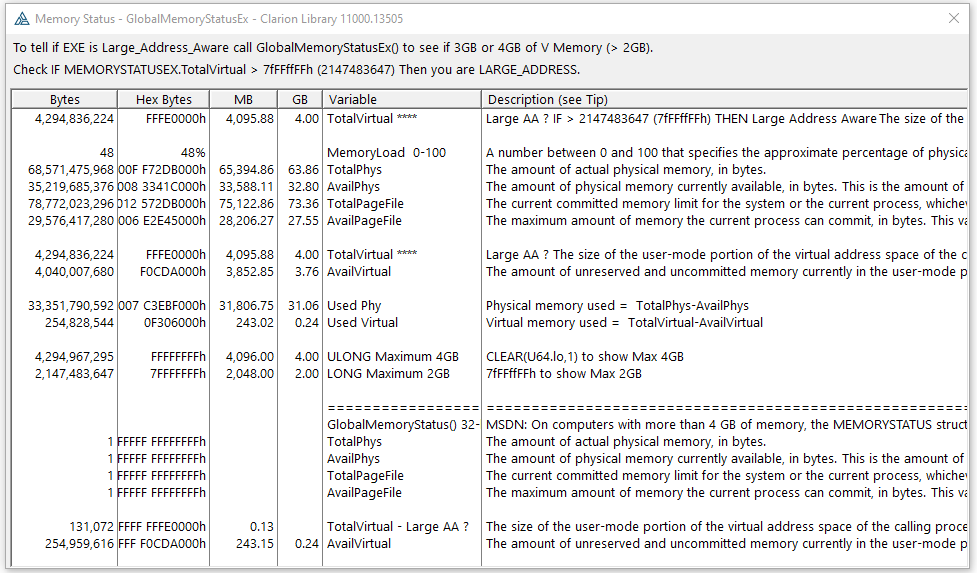
Each Process gets a Virtual Memory Address Space of 4 GB. The actual 4 GB of pages used in my 64 GB of Physical Memory chips is handled by the Virtual Memory Manager. So NO it is not limited to using the first 4 GB of physical memory.
For more info Google Windows Virtual Memory …
The VM Map tool is interesting to see how your process is using Memory
each 32 bit process gets its own limit. If you want to access more than 2GB, use LARGE_ADDRESS in the EXEName.exp file to access above that, but you can still crash once you hit a certain limit.
Thats not a limit. Your server can use all 8 gigs (and more).
Each 32 bit process is limited to 2 (or maybe 3) gigs (not 4). Its a different 2 for each process.
What you are seeing is that 8 gigs is plenty for your workload. If you are running a SQL Server on the box I’d look into allocating it more Ram, but its likely even that is not necessary.
If you have the nettalk global extension in your app, its already there.
But, to answer your question, you just put that text into one of your global embed points. I forget which one specifically offhand, but one of the ones which inject code into the export (EXP) file.
(I’ll dig out the exact one when im back at my computer.)
Ill add that its almost certainly not necessary for a desktop app. 2 gigs is plenty for most desktop apps. But it does no harm.
update: The embed point is “Inside the Export List”.
Traditionally, an EXE app wouldn’t need an .EXP file, so it’s a little strange to do it this way, but here’s an example. If you already have an .EXP, see if you have that in it. You only need this in the .ExeName.EXP not any DLLs.
OK, but that requires appgen.
Non-appgen apps do not automatically receive an .EXP file unless you create one. I have never created one unless I needed LARGE_ADDRESS.
Maybe the fact that it has worked fine is luck on my part.
well, depends
As long as you’re not dong math on it it’s fine to use a Long. ie if a API returns say an address, and you use that address later (passing it to another API) then 4 bytes is 4 bytes, so a LONG (in both places) works fine.