I have the initial size of the MainFrame of an app set to Maximize, and want to know if I can disable the ability of a user to “Restore Down” the window? I am wanting to have the Main Frame remain maximized, or Minimized.
This works here.
-
Set the appframe to start maximized.
-
In the appframe window TakeEvent embed at the top before the parent call
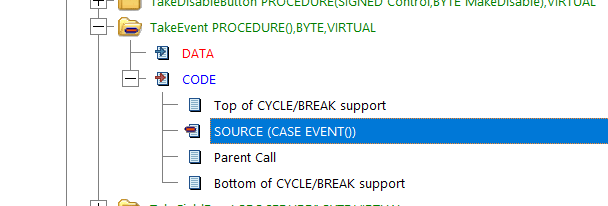
Put this code:
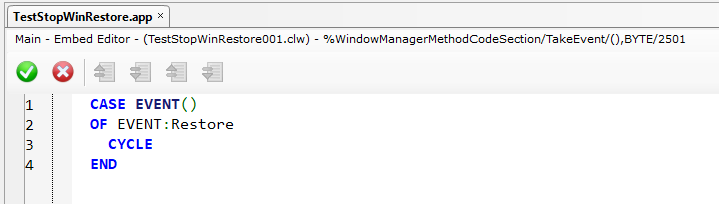
That causes the window to ignore the EVENT:Restore which takes care of the user trying to downsize the window via the icon or by double-clicking the title bar.
Charles
Thank You, that worked a treat.
Kenn
Does your frame allow Minimize?
EVENT:Restore is also fired if the Window is Minimized when the user tries to Undo Minimize i.e. Restore.
Better code for Minimize
CASE EVENT()
OF EVENT:Restore
   IF 0{PROP:Maximize} THEN CYCLE.   !Must stay Maximized
! or
   IF ~0{PROP:Iconize} THEN CYCLE.   !Do not prevent undoing Minimized
END
Tip: In Windows 10 & 11 when Minimized if you Shift + Right click on it on the Taskbar that gives you the System menu with Min,Max,Restore,Move,Size,Close. Without Shift+ you get a new Taskbar Popup that offers none of those.
Preventing standard Windows behaviors can be confusing, stressful and annoying to users. E.g. a Maximized window cannot be moved to another monitor (I think there is a setting to allow that).
Suggest you open Message() to explain to the user why he should leave it Max, but have buttons to allow Max or Restore.
Thanks for the input, sound advice I think.