How can I use Capesoft’s WinEvent templates to detect a duration of inactivity? I want the application to shut down automatically after a certain amount of idle time. I’ve tried adding message alerts for WM_MoveMouse, WM_LButtonDown, WM_RButtonDown, WM_KeyDown, WM_KeyUp and WM_MouseWheel. The code to run when these events are received is LastActivity=Clock(). When I run the app, my LastActivity value is never being updated. What am I doing wrong?
You could use xInactivity.
https://www.clarionproseries.com/html/xinactivity.html
It makes it easy to implement a sequence like warning a user that their session is about to expire, then logging them out and ultimately shutting down the app.
I use this code. Sorry I don’t remember who the original author was.
! ************************************  GLOBAL DATA - README FIRST! SHUTDOWN CODE ************************************
! * The LASTINPUTINFO structure contains the time of the last input.                    *
! Use the CleanCloseDownGlobal Template
! ***************************************************************************************
LASTINPUTINFO       Group, Type
cbSize                  UnSigned          ! Must be set to Size(LASTINPUTINFO).
dwTime                  ULong             ! Tick count when the last input event was received.
                    End

! In the main/frame procedure
! ************************************ MAIN LOCAL DATA SECTION - README FIRST! ************************************
lii                 Like(LASTINPUTINFO) ! Structure for GetLastInputInfo.
dSec                Real                ! Total elapsed seconds display.
idleSeconds         ULONG()

! ThisWindow.Init priority 500

 idleSeconds = LocalTimeOutInMinutes * 60 ! note is a Ulong e.g. for 10 minutes timeout LocalTimeOutInMinutes = 10

! Event timer priotity 5000
            If LocalTimeOutInMinutes <> 0 ! shut down back office if inactive
      ! ************************************ MAIN EVENT TIME  README FIRST! ************************************
      ! * Clear the LASTINPUTINFO structure each time the timer fires.                        *
      ! ***************************************************************************************
                Clear(lii)
      ! ***************************************************************************************
      ! * Set the size of the LASTINPUTINFO structure.                                        *
      ! ***************************************************************************************
                lii.cbSize = Size(lii)
      ! ***************************************************************************************
      ! * Call GetLastInputInfo() to see if the user has touched the keyboard or mouse.       *
      ! ***************************************************************************************
                GetLastInputInfo(lii)
      ! ***************************************************************************************
      ! * Calculate the total number of seconds elapsed since last user input.                *
      ! ***************************************************************************************
                dSec = (GetTickCount() - lii.dwTime) / 1000
      ! ***************************************************************************************
      ! * Check to see if the elapsed time is equal to or greater than the user-defined limit.*
      ! ***************************************************************************************
                If idleSeconds > 0 AND dSec => idleSeconds Then          ! Has the time elapsed?
                    GLO:CleanCloseDown = 1
                    post(EVENT:CloseDown)
                End
            END
Found the original download at Icetips. The original author is George R Curtis.
We use similar code but our SaaS runs on a server that we force reboot once a month because of the following reason – You may want to review
!- GetTickCount function (sysinfoapi.h) - Win32 apps | Microsoft Learn
!- Retrieves the number of milliseconds that have elapsed since the system was started, up to 49.7 days.
!- If not rebooted, then the number returned is negative. So - skip Idle time.
Just a heads up the GetLastInputInfo messes up with the new Win11 Hybrid Sleep /Modern standby and I’ve not found a work around for it yet.
The new Hybrid Sleep / Modern Standby means the computer goes into a very very slow idle mode and will appear to wake up hours later to complete stuff during the middle of the night, if all you have done is close a laptop lid so the session is locked.
I’d upload a screenshot but I get the message “ Sorry, there was an error uploading lastinputinfo.png. Please try again.” and I’ve tried a few times now.
Anyway I have found this link which explains the changes we need to make, but so far not been able to get it GetLastInputInfo to work properly yet.
Hi Kevin,
Thanks for the info.
Any servers I manage I schedule a reboot at least once a week (Windows Task Scheduler). There’s no way I let them run a server (that I manage) for more than 7 days without rebooting.
If they’re TS Plus servers I schedule a reboot nightly
The Inactivity shutdown option in my back office module is optional and set at the user profile level. It has no impact on the actual Windows session.
With the Appbroker/H5 I only deal with inactivity at the logon screen (they have 5 minutes to log in)
Cheers
Rohan
Thanks for the info. I’m not aware of any of my users using this on their servers and I would be strongly discouraging it if they expressed a desire to do this. 
Cheers
Rohan
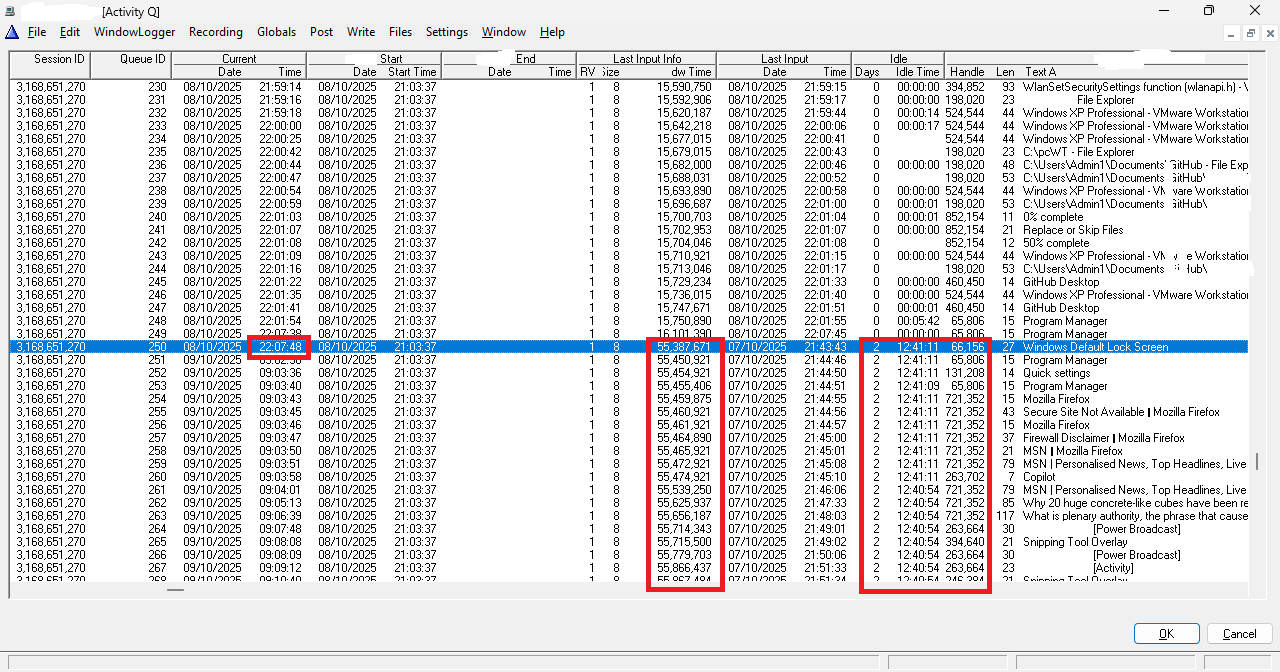
Here’s the screenshot showing the raw LastInputInfo data column going wrong when Win11 goes into hybrid sleep/modern standby and I’ve not been able to find a work around for it yet.
The Windows Default Lock screen in this example is the trigger, but a number of steps have to complete before it goes into hybrid sleep/modern standby which is explained here
The other problem with modern standby is the device will wake up for a short burst of activity during the middle of the night which isnt detected normally, this screenshot doesnt show it, but something to be possibly aware of.
For Terminal Service/RDP sessions, this api NtQueryInformationProcess and the PEB structure will tell your app if its running in a TS/RDP session. A Clarion source code example of this in use can be see here
Hi Rich
Thanks for the insight.
I already check to see whether the user is logging into a terminal server or whether they’re on a LAN. If they’re on a LAN it’s not too much of an issue for me as I use the IP Driver for networked installations.
Allowing a terminal server or even a data server to go into sleep/standby mode seems rather risky to me.
I guess the only solution is to ensure that the users don’t have sleep/standby mode enabled?
Thanks
Rohan
Its not the Server thats likely to go to sleep/standby, its the TS/RDP session thats most likely to do this.
Having an app that can detect its being run in a TS/RDP session, can be useful for working out whether it needs to do nothing or go to shutdown.
Win11 how something called ActiveHours, in Win10 it was first known as Quiet Hours and then changed to FocusAssist, which could help your app decide if it needs to go to sleep/pause or shutdown.
ActiveHoursStartActiveHoursEndActiveHoursMaxRange
Active Hours can be adjusted by modifying specific registry values under HKLM\Software\Policies\Microsoft\Windows\WindowsUpdate
This might be important if running a cloud account where you dont want to pay for idling clock cycles, but equally important when running on a laptop battery. In fact, Win11 24H2 (25H2 is current) has a new mode called EnergySaver and it gives me upto 11 hours on battery with moderate wifi use. Social media like Reddit burns the laptop battery the most but I will still get 8hrs of laptop battery doom scrolling Reddit to its last front page post. I also run the screen brightness at 50% and sit in a dark corner of Wetherspoons.drinking their refillable £1.81 coffee from their £14k coffee machines. 