How can I differentiate between a drive and drive plus folder?

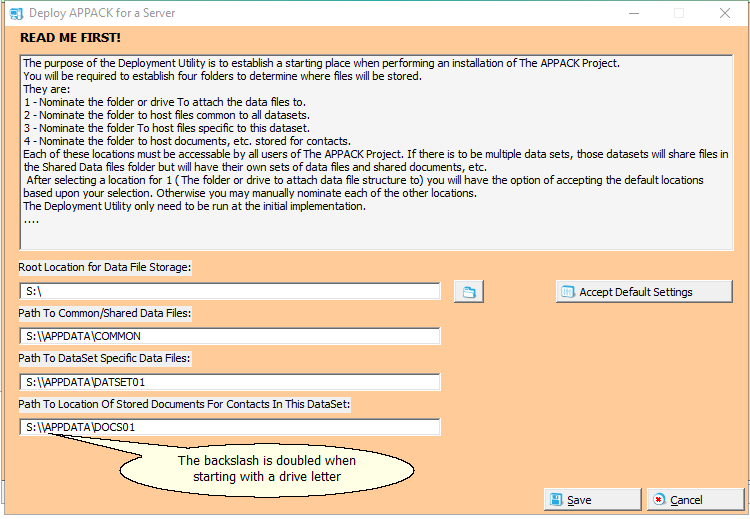
I am trying to create a situation where I can build a data file structure, dependent upon a selected starting point. I am using a the following code to select the starting point for my structure.
! Get the root data location
!------------------------------

IF FILEDIALOG(‘Select the root location for the data files.’,GLO:AppData,‘’,(FILE:LongName+FILE:Directory+FILE:KeepDir))
DISPLAY()
END
My problem is that if I choose a Drive letter only, I get a following back slash ‘\’ which I accept is correct, and when I choose a folder, there is no following back slash. My code to build the structure I am seeking works just fine with a selected folder, but when it is built directly to a drive letter, I end up with a double backslash.
My struggle is with identifying that a selected location is a drive letter, and then removing the backslash before adding my structure?
For the immediate problem, I would probably avoid making the rest of the code care whether the user selected S:\ or S:\SomeFolder.

The cleaner approach is to normalize the selected root once, then always append child folders without a leading backslash.

The drive-root test itself is simple:

LEN(CLIP(ThePath)) = 3 AND ThePath[2] = ':' AND ThePath[3] = '\'

That identifies a path like:

S:\

But I would still solve the larger problem by making sure your base path ends with one backslash before you build the rest of the structure.

Conceptually:

RootPath = CLIP(GLO:AppData)

Then:

If RootPath does not already end in \, add one.

After that, build the child paths without starting them with \.

So instead of building something like:

RootPath & '\APPDATA\COMMON'

build it as:

RootPath & 'APPDATA\COMMON'

That way:

S:\ becomes S:\APPDATA\COMMON

and:

S:\SomeFolder becomes S:\SomeFolder\APPDATA\COMMON

without needing special handling throughout the rest of your code.

This is also a good place where vuFileTools can help with the rest of the job.

Once the paths are built correctly, vuCreateDirectory() can create the full directory structure, and vuFolderExists() can verify that the folders exist. If you also want to validate the selected drive before creating folders, vuDriveType() can tell you what kind of drive you are dealing with.

So I would separate it into two steps:

  1. Normalize the selected root path so it has exactly the separator behavior you expect.
  2. Use vuFileTools to validate and create the resulting folder structure.