Hi,
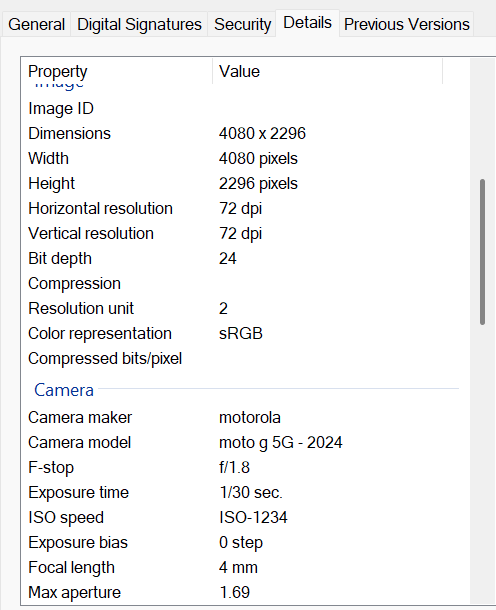
I am taking landscape photos of small documents like auto registration ( approximately 3 inches high by 5 inches wide) . For example a jpg photo will be 4080 pixels wide and 2296 pixels high. When this photo gets taken by the user on their phone and Uploaded To NT app using Advanced HTML5 File Uploader, it get saved as a file with a width of 2296 pixels and height of 4080 pixels - this is rotated 90 degrees clockwise. I am submitting the images to OCR so I want them to be true and not rotated.
So, question - why does this happen?
What don’t I know that you do?
How can I get consistency when a picture is taken landscape it is saved as landscape?
I am trying to avoid importing the uploaded image to ImageEx and manipulating it.
Any info is appreciated.
Thanks,
Ron
Sounds like you are not communicating the EXIF/Metadata along with your images. That’s the thing that has the orientation/rotation info.
Is the thing that consumes the uploaded file (I assume, your app) using that feature, though?

PMI, but what is this?
Youre setting the width and heightvof the image control there. 300x 200. Im not sure why it rotates the image but maybe thats in play?
Hi Bruce,
Yes, I am setting width and height for image display. However, If I open the picture in windows Picture viewer as well. That tells me that is is most likely not a display issue but some sort of file save issue.
Ron
Android will auto rotate an image after its been taken, so when you copy/move the image to some other location, it will be auto rotated.
Its a bug which has been around for years, because its buried deep in the core of Android, because the auto rotate setting is system wide.
This thread will be useful.
TLDR Install a new camera app or lock the orientation.
https://forums.androidcentral.com/threads/stop-automatic-rotation-of-photos.1083342/
To trigger it, just take a photo of something with the phone held pointing down. The camera app will hold the initial rotation on screen to take the photo, but when it comes to saving the image after the shutter button has been pressed, you can see it quickly auto rotate the image.
Hi All,
I have found that if I take a photo of the registration ( 3 in x 5 in) in PORTRAIT mode, it will save in portrait mode. If I take the same picture in LANDSCAPE mode, it will turn it 90 deg and save it in PORTRAIT mode. Interestingly, when it saves the Landscape in Portrait mode, it wants to display it in Portrait mode on the camera no matter if it is in Portrait or Lanscape position. Interesting.
Ron
HI All,
RESOLUTION. I found that the display image position ( portrait / lanndscape) depends on multiple factors. Easiest solution was to display the picture and give the user a button to rotate the picture 90 deg with each press. Then they can see what they have. I have the image in a blob so with imageEx it was easy to read from blob and rotate 90 deg and save back to blob.
Ron