TXA Registered in the Registry

Anyone seen this before?

It appears to be a TXA file registered in the template registy.

It cant be unregistered.
It can be enabled and disabled.
Renaming the registry.trf file to oldregistry.trf (1010kb) with the IDE closed, and then reloading the IDE creates a new registry.trf (1kb) but the entry is still visible.
There's only 2 trf files (oldregistry.trf and registry.trf) on the win7 vmware guest os.
The original entry sat at the very bottom of the list, so easily missed if the window wasnt maximised and loads of other templates were registered.

Is this a hack?

Weird.

Doesnt seem to be any way to get rid of this entry other than wipe the vvmware guest and reinstall windows and C6 again.
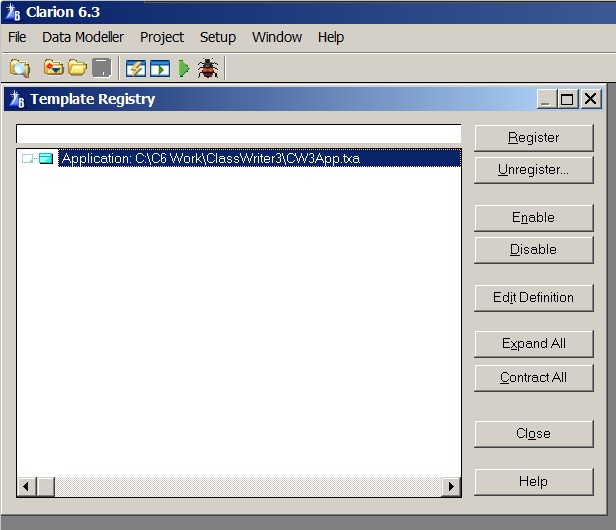
This gets stranger, the file doesnt even exist on the VM, so where is it getting it from, or has part of Clarion 6 been hacked and edited?

Well using notepad++ to search for CW3App.txa in files found in the C:\Clarion6 returns

C60EE.ini

[Default Application]
1=C:\C6 Work\ClassWriter3\CW3App.txa

and C60EE.dat

[dc2]C:\C6 Work\ClassWriter3\CW3App.txa[nul]

This thread has come up in the search for C60EE.dat

It doesnt appear to be a clarion 2.1 dat file that can be read easily by a dct import though.

Oh well, will see if deleting it resets things...

Deleting C60EE.dat didnt get rid of the entry in the template registry, but deleting C60EE.ini did.

Obviously deleting the C60EE.ini file means the serial number needs to be put back in place.

So all the C60EE.ini has now is

[User]
_version=45
name=[My Name]
serialno=[My Serial Number]
key=[dont want to give any security algorithm away]
[Environment]
windows95dlgs=on

All the other stuff from the ini is missing, but importantly the template registry now shows, No Classes.

Problem solved.

Its interesting how the ini file gets populated with all the other settings, and the [Environment] section is fleshed out.