If you want your popup window to appear with its own taskbar button, you are going to need to adjust the window styles a bit and I use SendMessageA to post back to the main frame thread, as this injects yourself into the mainframe thread straight away, no need for synchers then, add the action or event to a queue on the mainframe thread and process at your leisure…
Havent finished the ISWA_SetWindowPos code but thats needed to update the window style changes after ISWA_SetWindowLongA.
Loc:WindowHandle            =  0{PROP:Handle}
Loc:PreviousParentHandle    = ISWA_SetParent(Loc:WindowHandle, 0) ! Remove Parent Window Handle
!!Loc:OwnerHandle = ISWA_GetWindow(Loc:WindowHandle, ISEQ:WindowStyle:GW_OWNER)
!
Loc:StyleExtendedOriginal   = ISWA_GetWindowLongA( Loc:WindowHandle, ISEQ:WindowStyle:GWL_EXSTYLE)
!
Loc:Mask                = 0FFFFFFFFh - ISEQ:WindowStyle:WS_EX_TOOLWINDOW  ! All bits set except the one we want to clear
!
Loc:NewStyle            = BAND(Loc:OriginalStyle, Loc:Mask)  ! Remove tool window
Loc:NewStyle            = BOR(Loc:NewStyle, ISEQ:WindowStyle:WS_EX_APPWINDOW)  ! Add app window
Loc:PreviousStyle       = ISWA_SetWindowLongA(Loc:WindowHandle, -20, Loc:NewStyle)
!Display()
!!Loc:Bool                = ISWA_SetWindowPos(Loc:WindowHandle, ISEQ:WindowStyle:HWND_TOPMOST, Long pX, Long pY, Long pCX, Long pCY, Ulong puFlags),Bool,Pascal,Name('SetWindowPos')
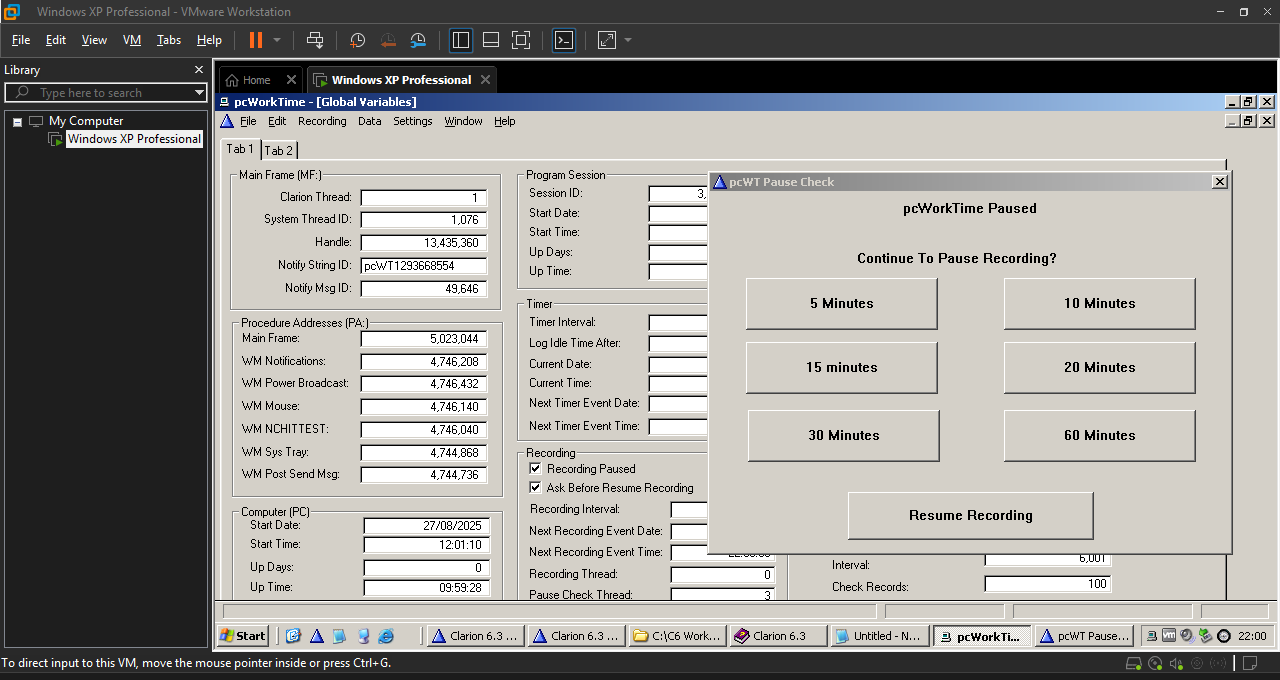
The last two taskbar buttons and the first systray icon all belong to the app. Had to code the systray icon handler myself.
Because Notify is LIFO, you could get away with using it simply to bump the accept loop, and then process events or actions from your own Queue in a FIFO manner, but once you start stepping away from the Clarion default options, you’ll rapidly get down into windows api which will slow things up a bit discovering just what exactly is going on in the Clarion runtime.