I am trying to implement a Relational Tree using Clarion9, and am having a problem I have not been able to resolve.
I have a Contacts file with a SysID field [CON:CONSysID, auto numbering, unique number]
I have a Diary Topics file with it’s own SysID [DIT:DITSysID, auto numbering, unique number] and the SysID of the Linked Contact. DIT:CONSysID, from CON:CONSysID]
I have a Diary Content file with it;s own SysID [DIC:DICSysID, auto numbering, unique number, and DIT_DITSysID from the linked Diary Topic.
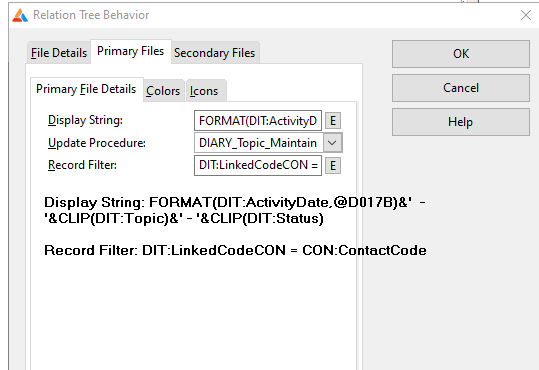
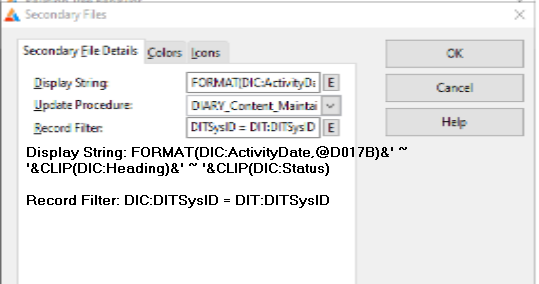
My issue is that when I try to complete the Relation Tree Behavior dialog, I can enter the Primary file, however when I try to enter the secondary file details, I have not been able to get those details to save.
Any suggestions would be really appreciated.
I have zero expertise with that template, as I threw up my hands decades ago and resorted to Ultra Tree. The product still exists, but its creator, Phil Carroll passed away. Ultra Tree does take a whole lot of work and $$ to get working initially though.
Another alternative that I have used in a couple of places with good results was SysTree. It is free, but unsupported. It is also a lot of work to get working, but the end result is often easier to maintain than a standard tree, because you don’t really have to process everything in recursive order. SysTree download | SourceForge.net
Not sure what your not saving problem is, but there will be other problems you will have with that template. When the ABC classes were written 25 years ago or so, the relation tree was pretty much left as it was – just template-generated stuff like the Legacy templates, no classes to support it. And unfortunately no one ever got back to it.
It looks like, for a particular contact you want to have your tree with the topics (primary file) and content (secondary file). Depending on the size of your files, that may not work for you. I just tried to set up something similar where I want to have request as the top level of my tree, limited to a particular case_id, and then the requirements below that request. So I used the filter on case_Id fpr the primary file, and the generated code looks like this:
Access:REQUEST.UseFile
  SET(REQ:RQS_C_ID_IDX)
  LOOP
    IF Access:REQUEST.Next() NOT= Level:Benign
      IF Access:REQUEST.GetEOF()
        BREAK
      ELSE
        POST(EVENT:CloseWindow)
        EXIT
      END
    END
    IF NOT (REQ:CASE_ID = 123) THEN CYCLE.
So, to set up that first level of the file it is going to look at every request in the request table, but it’s going to filter out any that don’t belong to the particular case I specified (123 in this case) – note it is a cycle, not a break. So if I have 200K cases and each has about 20 requests, it is going to read 4 million rows before it even starts to try and show you the tree.
I think I would probably be tempted to take the generated code, copy it, modify it to my needs (in this case do a set(key,key) and a break), and if you have trouble with what is displayed on each level you could fix that at the same time.
I’ll also point out that normally you would not have a filter on the secondary file – the limit to the particular topic comes from the relationship in the dictionary.
Hi,
I agree with the JonW’s points…
The only difference I can see with our code here at work (v11.1) is that we surrounded the picture tokens between “'”:
FORMAT( DateField, '@D017B')
When you say:
You mean you enter the information then when you go back to the template prompts they’re empty?
If so, I’d start with something small and simple like CLIP(DIC:Status) and see if that works. Also enter and then immediatly exit the procedure.
I know I had trouble with the multichild template doing weird stuff like that and I had to follow a precise pattern to save stuff. I haven’t have troubles with the normal template. I’m on 11.1 / 12 though and this sort of thing might have been fixed inbetween times.
Also you don’t need to put in the filter for linking the tables. The template gets that relation info from the file schematic you entered.